Patchboard
A self-hosted start page that tells you what's broken
- Release
- v1.14.0, November 15, 2026
- License
- AGPL-3.0, open source
- Source
- sourpatchdad/patchboard
- Stack
- TypeScript, React, SQLite, Hono, Docker
On this page
Why I built it
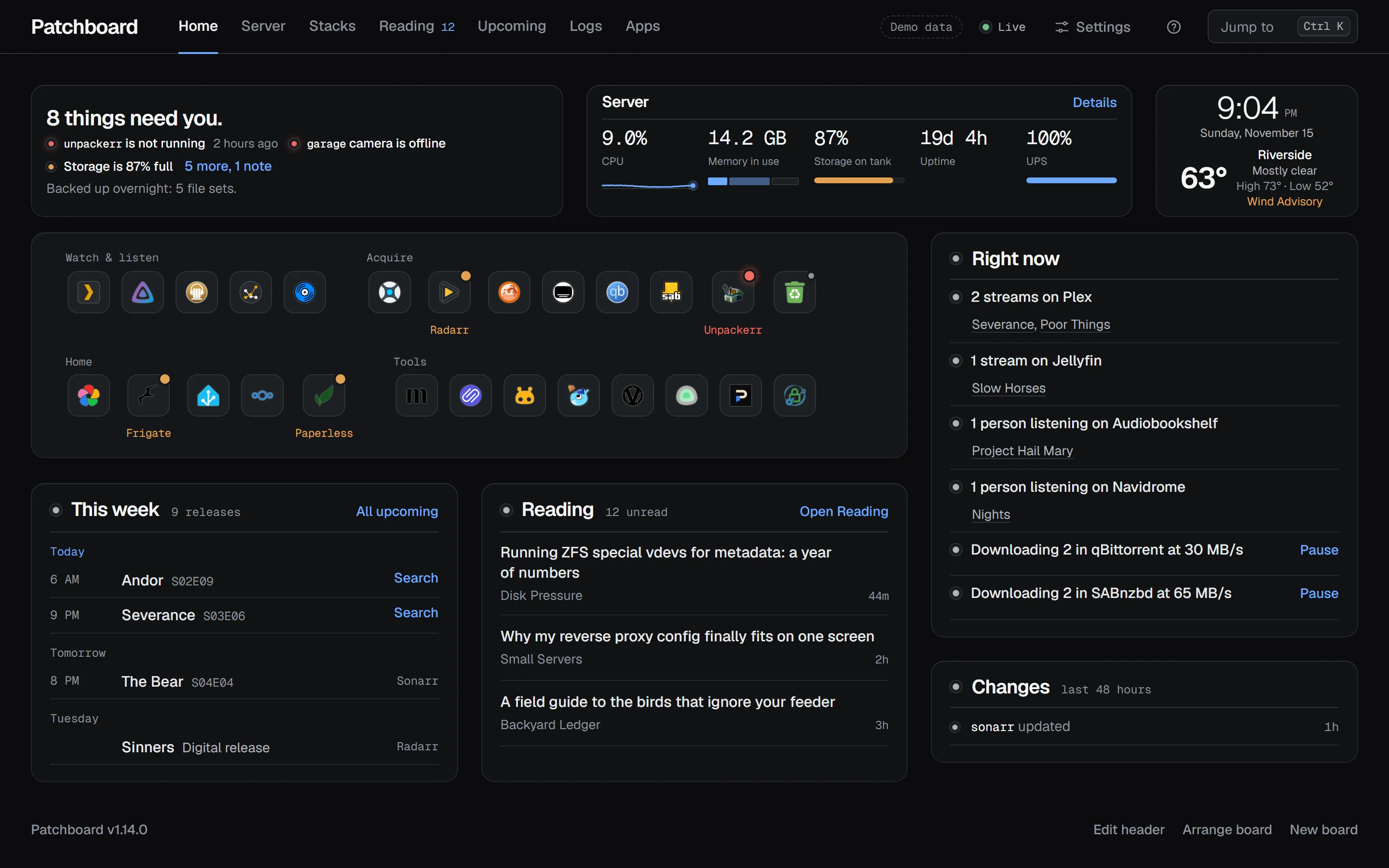
I wanted one place to see how my server was doing. Most of the start pages I tried were great at organizing links, but they didn't tell me when a container stopped overnight, a storage pool was filling up, or something needed attention. So I started building what I actually wanted to use: the important stuff up front, a quick way to fix what's wrong, and everything else within reach.
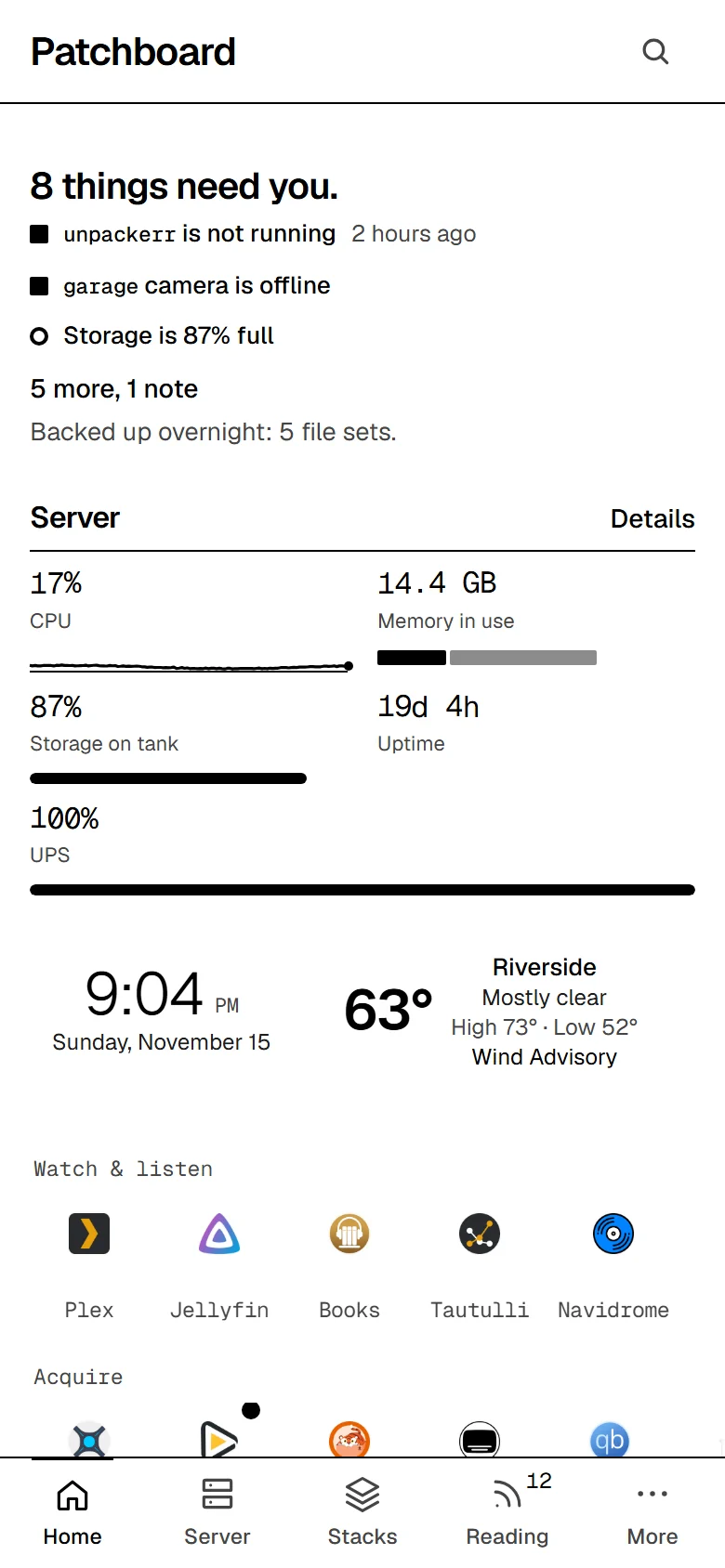
I use Patchboard every day, mostly on my phone with the E-ink look enabled. I also have it running on an old Kindle Fire under my monitor, partly because it's useful and partly because I enjoy seeing what I can make it do. The more I use it, the more ideas I get. It's still evolving, and that's a big part of the fun.
What it does
Patchboard reads the Docker socket, finds your apps, and connects to the services behind them. Three things it does every day:
What needs you
The top of Home says "All quiet" or "8 things need you", one problem per line, each linked to its fix: a container that stopped, a camera that went offline, a pool past its warning line. The browser tab shows the count. A container that crashed overnight still shows under Changes in the morning, and with ntfy, Gotify, Pushover, Discord, email or a webhook turned on, a problem that lasts two minutes reaches you, then again when it clears.

One click from the fix
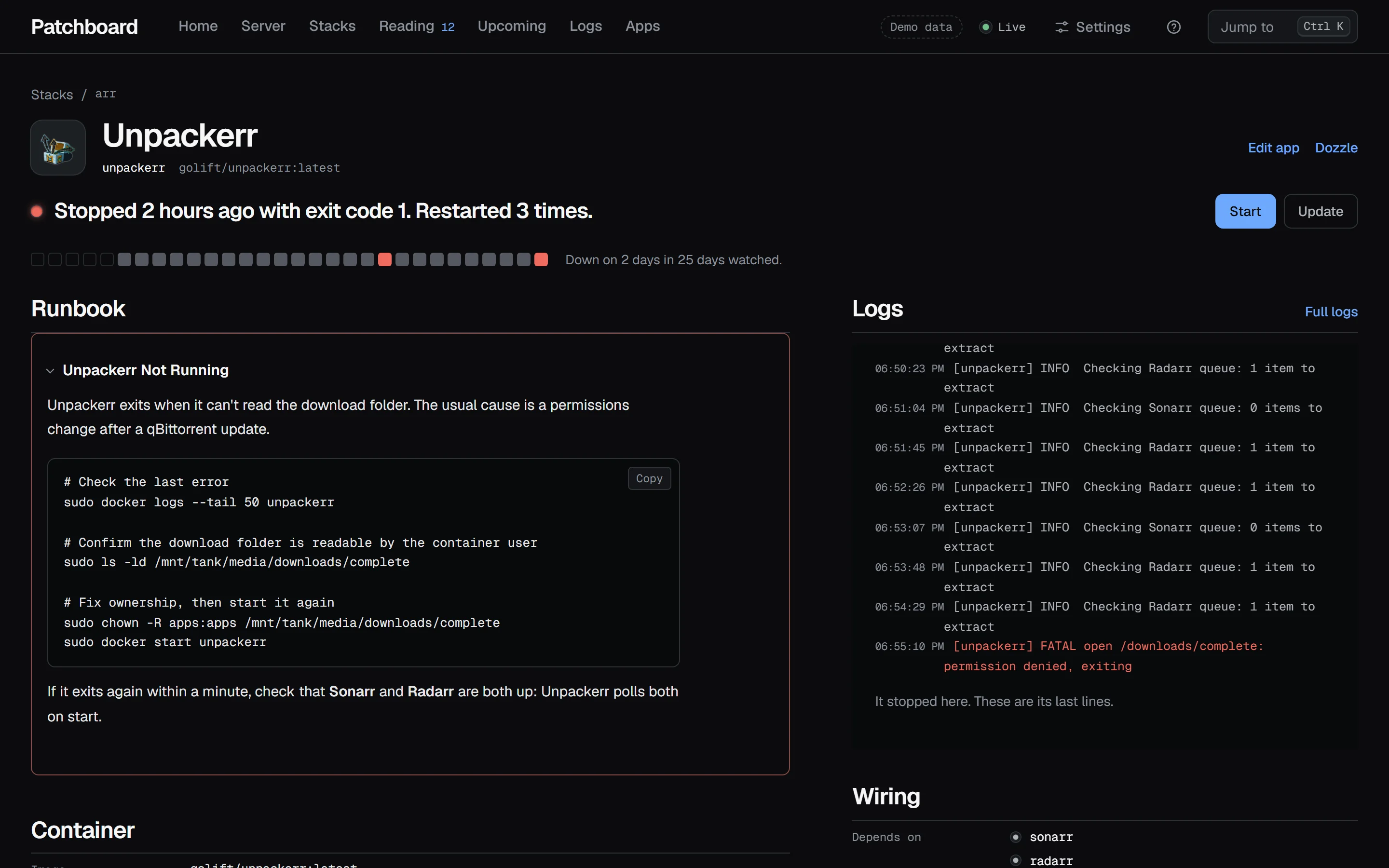
Every container has its own page: what's wrong in one sentence, a 30-day health strip, the section of your runbook that covers it, live logs that stop where it stopped, and buttons to start, restart, update or roll back. The runbook comes from a Markdown file you keep; Patchboard only reads it.
Screens around the house
The same server, on whatever screen is nearby
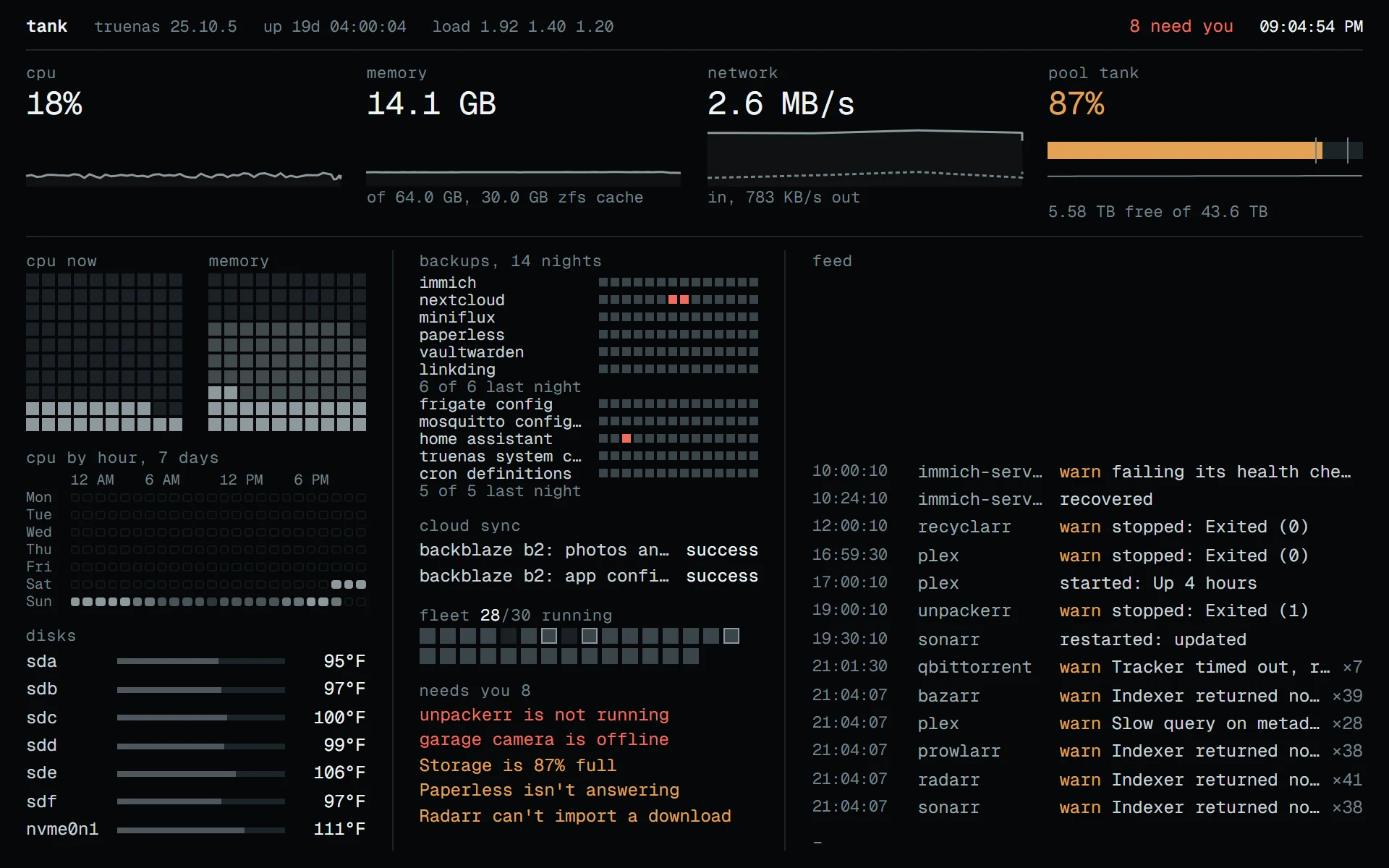
A wall tablet, an e-ink reader, a small panel or a phone. Each household device is set up from a link or a QR code and configured from your desk in Settings, Devices: the pages it swipes between, the hours it dims, its theme and units. It can look and use the household controls, and it can't touch the server.
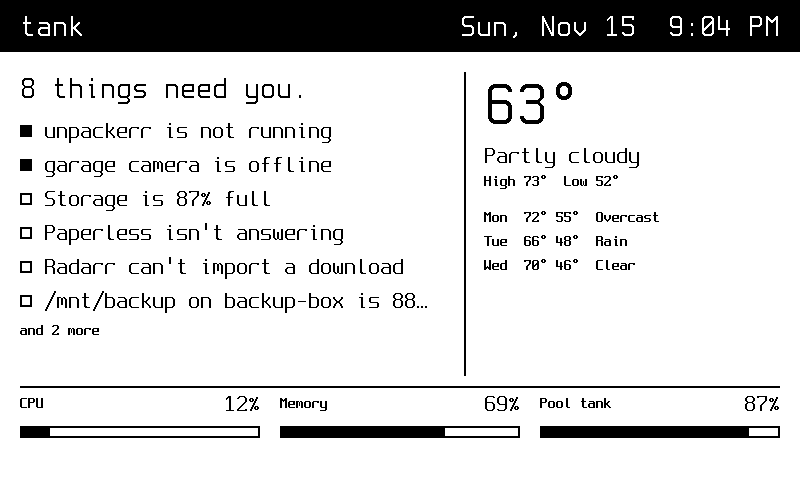
- E-ink look Black on white, no motion, problems marked by shape, and a redraw once a minute. It's a setting for a phone or desktop (Settings, Look) and for an e-ink reader with a current browser (Settings, Devices).
- Real e-ink A reader set to E-ink, or one of the panels above. A Kindle e-reader's own browser is too old to run Patchboard.
And the rest, without screenshots:
- 69 integrations Sonarr, Radarr, Plex through Tautulli, Jellyfin, qBittorrent, Home Assistant, Pi-hole, TrueNAS, weather and more. Paste an address and a key, test, save. Any JSON API works for a number on a tile.
- Apps without config files Add all turns every running container into an app, grouped by compose stack. Coming from Homepage, Settings imports its
services.yaml. - Boards Home is a board of widgets on two to six columns: drag to move, drag an edge to resize, and add boards for the TV or the wall.
- The house From Home Assistant: lists, the thermostat, shades, who's home, and Frigate cameras that open live when tapped.
- Reading and Upcoming A Miniflux reader, and Sonarr, Radarr and Trakt in one calendar.
- Language English and six more, with dates, numbers and prices for 28 regions.
How it's built
One container, a browser app and a server. The browser only ever talks to Patchboard; Patchboard talks to Docker and to each app.
Screens
- React 19 app, built with Vite
- Phones, desktops, wall tablets from a household link
- Panels fetch
/panel/<token>.png
Patchboard server
- TypeScript on Node, Hono
- Sign-in: off, password, forward auth or OIDC
- 69 adapters, each on its own schedule
- Alerts and notifications
- SQLite: history, boards, activity log, sealed keys
Your server
- Docker socket, or a socket proxy
- Compose folder, mounted read-only, for updates
- Sonarr, Plex, Home Assistant and the rest
- Discovery and control Patchboard reads containers, stats and logs through the Docker API, either the socket or a socket proxy that narrows what it can reach. It can start, stop, restart, update and roll back, but read-only mode turns every action off, updates run only where the compose folder is mounted, and the slim image has no Docker CLI at all.
- One adapter per integration Each polls on its own schedule, faster while something is playing. One failing integration marks its own data stale and nothing else stops. Jellyfin, Emby and Audiobookshelf push over a WebSocket instead, and the server pushes changes to every open tab.
- Credentials stay on the server Keys are write-only from the browser, sealed with AES-256-GCM before they reach SQLite, and the key that seals them lives outside the database. A key is only sent to its own app's address, and app logs are masked before they're shown.
- Small on purpose Node runs the server's TypeScript directly, with no build step. There's one container and no database server, and it idles at about 50 MB of memory. No telemetry; notifications go only where you point them.
Run it
Try the demo first. It's the real app on invented data, and nothing is saved:
docker run --rm -p 3200:3200 -e DEMO=1 ghcr.io/sourpatchdad/patchboard:latestThen open port 3200 on that machine. To install it for real:
mkdir patchboard && cd patchboard
base=https://raw.githubusercontent.com/sourpatchdad/patchboard/main
curl -fsSL $base/examples/docker-compose.yml -o docker-compose.yml
docker compose up -d
Security Sign-in is off by default, for a home network. Read SECURITY.md before you expose it anywhere: turn on a password, or put it behind forward auth or Cloudflare Access.
latestThe newest release. Most installs want this.1or1.2Stay on 1.x, or on fixes to 1.2.edgeEvery change on main, about a week before it's released.-slimAny tag without the Docker CLI: it can't update containers, and it's about 90 MB smaller.
Still being built
Patchboard is new and I'm still working on it most days: the interface, the integrations, and how it behaves on each kind of screen. These are the releases that changed what it can do.
- repoThe repository, public from the first commit
- 1.0.0Home, container pages with logs and actions, live playback and cameras, and setup in the browser
- 1.3.0The Monitor, and household links for wall tablets
- 1.7.0Wall tablets that swipe between pages, boards for the wall, and the E-ink screen
- 1.8.0Panels with no browser, from a one-bit picture
- 1.13.0The house from Home Assistant, kitchen tablets, and six more languages
- On edge, not released A read-only API with its own keys and an MCP endpoint, for scripts and assistants, and a first run that fits on one sheet.
- On the roadmap Several Docker hosts, Unraid and TrueNAS app templates, running without Docker, and an accessibility audit.
- On my desk A dedicated e-ink display for the office wall, running the panel picture. I haven't built it yet.
- Contributing Bug reports, integration requests and pull requests are welcome. CONTRIBUTING.md covers running it locally and what a new integration needs. Security problems go through SECURITY.md, not a public issue.
Adoption
- GitHub stars
- 37
Stars as of November 15, 2026, from GitHub. The repository has been public since November 4, 2026, and the first release, 1.0.0, came out on November 10, 2026.